Showing posts with label mobile. Show all posts

Sunday, June 26, 2011

MidpSSH – SSH at your fingertips

Smile
While browsing the web for new J2ME programs for the software collection in my LG KU250 mobile I just happened to come across this little piece of software called MidpSSH, an SSH and Telnet client for MIDP 1.0 / 2.0 (J2ME) devices such as Java(tm)-capable cellphones and other mobile devices. Wow That’s pretty amazing!
Well with this little piece of software enables to control any public server with SSH enabled to be used and controlled from any corner of the world with a GPRS access. It’s true that with my mobile it’s bit difficult to use since the screen real state is very constrained. But with a caliber phone it would be really useful.
Following is a short video demonstration of the software.
MidpSSH Demo
[Posted using Windows Live Writer 2011 on Windows 7 64bit]

Monday, February 16, 2009

Viewing PowerPoint Presentations on LG KU250.

:-)

On last Saturday the provincial elections on North Western and Central Province were held. Being it in the middle of a exam season I did not had much of a enthusiasm to cast my vote but anyway my parents suggested me to have a visit if any means. Well I had no objections other than the fact that I will loss almost a whole day on the road in which time I could go trough some lecture slides.smile_thinking

OK there is possibilities to read while travelling. Printing slides, Reading on the laptop or on a ‘Smart’ phone.mobile. I didn't feel like printing it just for a one day use. (Not because of Green IT but I’m not a fan of papers) neither I wished to carry my heavy weight laptop. I’m not wealthy enough to have a ‘Smart’ phone either.

But I figured out that I can save my PowerPoint slides as .jpg images so that I can have a look on the go in my LG KU250. So yet you can read office docs (with some conversions) on your non ‘Smart’ phone if you are smart enough. smile_nerd

IMG0140A

And yet I can do multitasking as well. Listening to some music and/or browsing the web… As I always say It’s freaking brilliant. So then I have found one more usage of my beloved mobile phone..smile_regular and I could read some slides on the way back and forth home.

IMG0141A

[Posted using Windows Live Writer on Windows 7 Beta]

Wednesday, January 21, 2009

Almost Screwed up!… - Upgrading KU250 Firmware.

While browsing trough the LG site on Monday for the LG KU250 user manual I got to know that they have released a LGMobile Updater Application for downloading Manual documents(PDF), Software and Phone Firmware Software.

Even though it appeared that the manual for KU250 is not available to download and the PC software version is also a bit older than the one I got on the CD came with mobile I noticed that this software supports firmware upgrading of KU250 to newest firmware. So I decided to do a firmware upgrade to my mobile.

In fact wanting to firmware upgrade despite the possibility of loosing user data such as SMS, Configuration data etc. is another story. The original s/w version available in the mobile was KU250_V10d. But as I have pointed in a previous post this has a problem when transferring files with long file names from a PC. At that time I tried to resolve this with local LG agent and failing to resolve, went ahead with a Full flash myself using LGMDP flashing software (Use LGMDP_Open) and v10c firmware (Credit goes to Dengel) found from some GSM community site. Of course at that time I had to try two or three times with a great risk of ending up with a bricked phone before getting the mobile flashed correctly. Even though this freed up blocked memory due to files transferred to phone, J2ME engine in v10c had some issues that prevent normal operation of Opera Mini 4 browser.

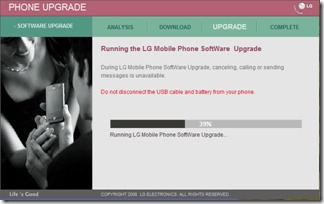
That is the story of my previous experience of flashing KU250. This time with new LGMobile Updater Application it seemed that the firmware is an straight forward operation. I removed MicroSD, SIM and connected phone using normal data cable and selected Start Upgrading…
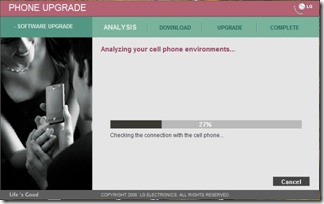
PhoneUpgrade_1 PhoneUpgrade_2 PhoneUpgrade_3

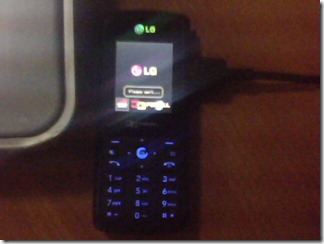
IMG0235A

And.. Well It completed all right without any errors. But…

Houston, We have got a problem… Not a single character is displayed now… smile_sad

I tried again the same procedure but the same result. This time I copied .DZ file from the LGMobile Updater application’s data directory (This file is deleted as soon as upgrade completes) and flashed using the old LGMDP program yet the same result.

So then I tried flashing the old firmware back in order to rectify the problem.

Flash_7

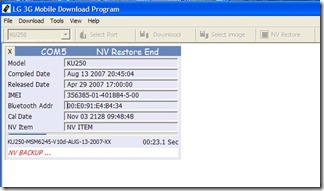
It goes on Backing up NV…

Flash_1

Writing QCBL, AMSS bla bla.. rebooting and restoring NV..Flash_2

And erasing media…

Flash_3

But there is a problem erasing media files (Since some already open to display Battery charging up/ Battery Full display?) So tried again. This time battery charging is not displayed in mobile and There is a Yellow box over the LG logo saying Refreshing… (Media file missing to boot further?)
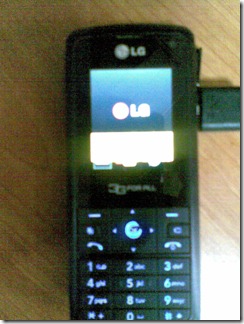
20012009(010)

However this goes trough all of the above steps and ultimately up to media downloading…Flash_5
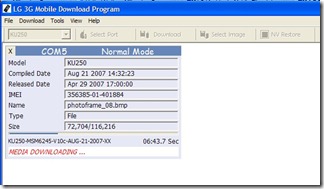
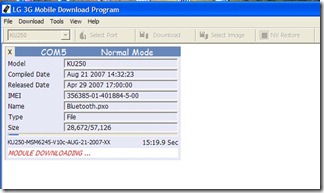
And Module downloading…

Flash_6

If my memory is correct last time everything went well and flashing completed. But this time luck is definitely not on my side… Module download breaks in middle and phone keeps rebooting again and again… Seems no chance of re-flashing as it is now not even detected in the flasher. smile_confusedsmile_confusedsmile_confused So now I’m in a situation that until I flash those modules, it is not detected and without it’s being detected I can’t flash it…

However, fortunately I can yet go to Emergency download mode with 2+5+Power key combination.

Flash_4

However this time only subset of files is there and No Media Image/ Module Image selection option. So even though flashing completes the problem is not resolved. Then I did Selected Erase EFS option from the dropdown box (There is nothing else I can try right?.. smile_thinking) and that time it fixed the problem of rebooting. Then I again flashed in normal mode with Erase EFS option On. That time it went all well. and previous Firmware was restored but there was yet a problem that No Wallpaper files or any default media files. (Possible caused by incomplete NV backup - I noticed one with less number of entries in the NV backup directory)

However now I was pretty much sure that you have to delete the EFS in order to flash correctly and I went ahead with .DZ file with Erase EFS option. Phew.. Thank god everything went OK and I got my good old lovely mobile back again with original firmware… Wow.. now Opera Mini 4 works with no problem.. smile_teethsmile_teethsmile_shadessmile_shades

Guide to upgrade firmware in LG KU250 (Probably other models as well)

Try new LGMobile Updater Application. But this may end up your mobile screwed up if you are an unlucky person like me. smile_winkRemember to copy .DZ file while the flashing is in progress.

If above step had any issues, try re-flashing using LGMDP program with Erase EFS option in NV backup/restore. This will definitely erase SMS, Contacts, Other configuration settings etc. from the phone.

Files:

KU250-V10d-AUG-13-2007-MLY.dz

LGMDP_1_1_.5_Build_12.10_Release.zip

[Posted using Windows Live Writer on Windows 7 Beta.]

Wednesday, November 19, 2008

JBenchmark - Benchmark your J2ME mobile

:-)

Benchmarking is the act of running a computer program, a set of programs, or other operations, in order to assess the relative performance of an object, normally by running a number of standard tests and trials against it. It's more popular among computer enthusiasts as a method of comparing there workhorse with others. B-) B-) 3DMark and PCMark by Futuremark are popular benchmarking tools for PCs.
So why not have your mobile also benchmarked? Well now you can benchmark J2ME enabled mobiles as well. JBenckmark suite, developed by Kishonti Informatics has few benchmark tools to measure the CPU performance, Graphic performance and Multimedia capabilities of the device.
I have used JBenchmarkACE - ARM CPU Estimator and the result was a ARM9 Family processor running at 105MHz for my LG KU250. So how about yours?

Links,
http://www.jbenchmark.com/index.jsp

Regards,
Aravinda D.P.

Anexure

Test results
MIDP2 Imaging - LQ 173 Frames | 190 Frames (91%)
XML parsing 17 | 350 (4%)
Business math 76 | 556 (13%)
MIDP2 Game - MQ 771 Frames | 2884 Frames (26%)
Audio - MIDI 833 | 8333 (9%)
Route planner 165 Frames | 1783 Frames (9%)
Image Processing 10 | 122 (8%)
Game Physics 108 | 859 (12%)
Composite MIDP2 Game - MQ 624 Frames | 1763 Frames (35%)
JAR reading 120 | 2083 (5%)
Video - 3GPP 55 | 1234 (4%)
ZIP compression 13 | 194 (6%)
MIDP2 Game - LQ 998 Frames | 4836 Frames (22%)
Composite Business - MQ 173 Frames | 936 Frames (18%)
RMS read-write 12 | 400 (3%)
Composite Business - LQ 328 Frames | 1607 Frames (20%)
MIDP1 Game 504 Frames | 1522 Frames (33%)
Composite Business - HQ Failed / Not supported
Composite MIDP2 Game - LQ 807 Frames | 2619 Frames (30%)
MIDP2 Imaging - MQ 161 Frames | 179 Frames (89%)
Audio - MP3 88 | 1724 (5%)
Business Charts 266 Frames | 1390 Frames (19%)
Image loading (JPG) 9 | 106 (8%)
Image loading (PNG) 21 | 265 (7%)
Composite MIDP1 Game 354 Frames | 1270 Frames (27%)
Chess 11 | 164 (6%)
Shortest Route Search 21 | 197 (10%)
Map 261 Frames | 2137 Frames (12%)


* Data Shown as, Score obtained | Best Score (Percentage)

Tuesday, September 30, 2008

T-Mobile HTC G1 - 1st Android phone

After almost a year from the introducing of Android platform, T-Mobile has launched HTC G1 as the first Android phone to the market. It’s a touchscreen-enabled mobile phone with a full QWERTY keypad hidden underneath its decently-sized screen. While it has indeed been launched, it only go on sale starting October 22 and will be exclusively available on T-Mobile only. :-(


Prices are tagged as 179 US$ and the device is equipped with a 400 Mhz Qualcomm processor, 3.17" HVGA 480x320 display, 3.1Mpixel camera, WiFi, A-GPS, 3G/HSDPA. However the features lack are a desktop Sync Application, Video recording and a 3.5mm headphone jack.

More Details: http://www.t-mobileg1.com/

Wednesday, July 23, 2008

#132# - MobileCert

:-)

Few Weeks agoThe Sri Lanka Telecommunication Regulatory Commission (TRC) has issued a new set of guidelines in using mobile and CDMA phones. This step was taken to avert irregularities and illegal activities while minimizing threats to national security created by the irresponsible use of telephones. Under this the mobile operators in Sri Lanka was requested to implement a method to issue a certificate so that it can be validated that whether the registered owner is using the particular connection.
http://www.news.lk/index.php?option=com_content&task=view&id=6426&Itemid=44

Few days ago Dialog has implemented this and with effect from today Mobitel is also activated this feature. Now issuing code #132# in a mobile phone provids a message with the registerd user name, ID and mobile number. So it is expected that the armed forces and other security institutions will start to inspect this in near future. So the user's are adviced to make sure that they use the connections with regulations set forth to avoid unwanted troubles.

Thursday, June 12, 2008

Long Filename Problem in LG KU250

:-)

There is a bug in the LG KU250 firmware (at least as of software version 10d) that if you transfer a file with a long file name which is longer than that the phone supports the file simply disappears but the space is occupied from the common memory of the phone. (This problem may not occur if you used external MicroSD card.)

The only option appear to be to restore the firmware into default state. The reset function as well as clear all memory function doesn't solve the problem. A factory reset code wasn't available to be known at the time of writing.

Note: LG KU250 is The winning handset in the GSMA's "3G for All" program 2007.
http://ae.lge.com/products/model/detail/ku250.jhtml