Sunday, April 26, 2009

Google Similar Images. Since a picture worth 1000+ words.

:-)
Google has recently launched the Google Similar Images feature which is an experimental service from Google Labs that lets you find images that are similar with an image you select. For example if you do a Image search for “Jaguar”  You might receive something like below.
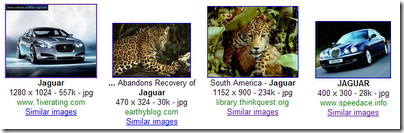
image
Now If you meant about the ‘cat’ You could click On Similar Images. (Notice the similar features of the images. Background color etc..)

image
Or more pictures of the brand of car. (Notice the similar features of the images. Background color Car orientation, Color etc… In fact all are different versions of same image…)image
Well That’s the example of Google themselves. Now I’m going to do few of my own searches.
Hmm well what does I search? Since I was fond of flowers recentlysmile_wink let’s try some flowers.
Search for Water Lily.
image
Now If I wanted to see Pink Water Lily (නෙළුම් මල්). (In fact single pink water lily on mostly dark back ground.)
image
or White water Lily (ඕලු මල්) (In fact single white water lily on mostly dark back ground.)
image
It’s very easy.
Now If I was looking for pictures with only one Pink water Lily it would be really difficult with just Image search.

image
Now Let’s try about Cherry blossom flowersmile_wink
image
Hmm I think I like to have similar Images to 1st results. (Single cherry blossom flower on white back ground.)
Oops.
image
Well 1st 2 pictures are OK. but rest? Well in fact it seems there are no any similar pictures of my cherry blossom flower and considering the image features we may consider the rest is similar to cherry blossom flowers. After all Google bots are just poor bots.
Hmm So what next? Well I do really like to have a feature that would let us to upload our own Image to Google and do a Similar Image search.smile_nerd
References/Links:
Hard at play in Google Labs with Similar Images and Google News Timeline
Google Similar Images
[Posted using Windows Live Writer on Windows 7 Beta]

Monday, April 20, 2009

Landed on Mars. Chase for the water begins…

:-)

Today the list of competitors advanced for the Imagine Cup Robotics and algorithms were published. Hmm It seems 237 are on chase for the water on Mars.smile_speedy

Top 20 Countries are as follows…

TW : 39
CN : 31
FR : 23
HU : 19
US : 16
KR : 10
BR : 9
DE : 8
IN : 8
RU : 6
PH : 5
PL : 5
EG : 5
CZ : 4
AU : 4
JP : 3
DZ : 3
CH : 3
LK : 3
AR : 3

So… Now It’s a matter of water or death.smile_tongue

[Posted using Windows Live Writer on Windows 7 Beta]

Wednesday, April 1, 2009

Проект Эйнштейна (Project Einstein) – Eyes Only

:-|

Every time I do some silly mistake I would normally wish that I could go back in time and compensate the mistake. Well can we really go back in time?

There are lot of really complex theories regarding this matter. However the most prominent idea has been (IMO) has been the dimensional physics. And today I’m here with results of my latest experiments at Loss Molpes Laboratory for Advanced Technologies.smile_nerd

I’ll explain the theory behind this as simple as possible. First Consider about what we can identify. In 3 dimension we can change the position along the 4th dimension or time axis when we apply a force. Now how can we travel along the 4 dimensional space time curve? Really simple. What you need to do is applying the same theory. But this wont do with normal force. What you need is the higher order counter part of the force we will call it a meta force.

But you should understand that even though you travelled along the time but at the same space you can’t materialize in that previous space time point. I’m not yet completely clear about why it’s so. May be that’s because of consequences of space time continuum or effect of parallel universe. However you can use the normal force fields of that past time space points. For example electromagnetic fields etc…

Hmm pretty much boring right? Well here I’ll show you some solid proof. (Well It’s not rock solid as I cannot materialize in the past) Go here and see my post on Feb 7th. Well what’s the catch? it just contains few questions from a exam paper. Except that it is from a paper which actually held few days later. clockI had travelled back in time and posted it using wi-fi. Bad that nobody read my posts. Otherwise you all guys could have obtain A+. Now wanna know something from future?

[Posted using Windows Live Writer on Windows 7 Beta]

Tuesday, March 31, 2009

Imagine Cup Robotics Round 2 mission released… Wild goose chasing at Endurance crater, Mars…

:-)

Follow up to the post In to the Mars – Neck breaking Opportunity.

Microsoft.Robotics.RoboChamps.Mars.splash

On last Friday (27th) challenge kit for the Robotics and algorithms round 2 was released. As it was expected this is re-launch of Mars challenge that was held as part of Robochamps league. But this time the simulation environment is more responsive and the task is bit more spiced up with collecting the data from rocks using a spectrometer.

RoverAnalyze

The sensors we have access includes color Navigation camera, Panoramic camera installed on the ‘head’ of the rover and two B&W hazard avoidance cameras on front and rear of the rover. Spectrometer which is in fact physically a touch sensor and a comlink which can be used to obtain the Pan, roll and pitch of the Rover as well as GPS location and some mission details (Positions of navigation areas)

The drives available includes Horizontal and vertical rotation of head, A Six wheel differential drive, articulated arm on which the spectrometer is attached on the end.

The objective is to navigate trough the given 6 points. Analyze a rock from each area and reach the heat shield. The navigation includes descending into the crater as well similar to the real Opportunity mission at Endurance crater.

The navigation points are obtainable from the comlink interface however the position that the heat shield dropped is bit of random and cannot be known for certain. So it ultimately becomes a wild goose chase to find out the heat shield. Even though it is said to be near the last selected point in practice it appeared to be near means almost half across the map.smile_tongue

With few days of experiments and coding I was able to come up with a solution that could navigate all the points successfully and analyze the required data.smile_nerd However I would certainly have to improve this solution with better algorithms and more reliability and or adaptability over the time. But no problem I have plenty of time left even till the challenge officially start on 20th of April.clock

Rover

More details.

http://imaginecup.com/Competition/mycompetitionportal.aspx?competitionId=22

http://www.robochamps.com/rc/info/Downloads/challenges.aspx

[Posted using Windows Live Writer on Windows 7 Beta]

Monday, March 2, 2009

In to the Mars – Neck breaking Opportunity.

:-)

Since the Imagine Cup Robotics & Algorithm competition Round 1 deadline is extended till April 1st I had decided to go and give a try on the Robochamps previous challenges. So I decided to give a try in the Mars Challenge which seems to be very interesting.

The sample kit is provided only with a VPL solution. However it is not a big deal converting a VPL diagram to C# code I first converted the VPL diagram into a C# solution and started developing an entry.

The environment and the robot recreates a scenario experienced by Opportunity, one of NASA’s real rovers in the Endurance Crater. There are 6 Navigation points that we should visit and finally we must reach the heat shield to complete the mission.smile_nerd

The obstacles are the rocks that are scattered over the terrain and safely maneuvering into the crater. The sensors available are A Navigation camera, Panoramic camera and two hazard avoidance cameras in front and rear. There is also a GPS data from the Communication link. So as an start I designed a solution which uses only the GPS data and travels the navigation points in sequence. The problem with this is the rower may hit a rock or stuck in the crater forever.

Following is the video footage of test run. Well fortunately there wasn’t any rocks on the path and even though the rover rolled into the crater in a neck breaking way finally it landed on correctly.smile_tongue

Hmm I think I should be bit more careful with a multi million dollar scientific robot like this.smile_wink Well let’s see how we can improve this more later..

[Posted using Windows Live Writer on Windows 7 Beta]

Monday, February 16, 2009

Viewing PowerPoint Presentations on LG KU250.

:-)

On last Saturday the provincial elections on North Western and Central Province were held. Being it in the middle of a exam season I did not had much of a enthusiasm to cast my vote but anyway my parents suggested me to have a visit if any means. Well I had no objections other than the fact that I will loss almost a whole day on the road in which time I could go trough some lecture slides.smile_thinking

OK there is possibilities to read while travelling. Printing slides, Reading on the laptop or on a ‘Smart’ phone.mobile. I didn't feel like printing it just for a one day use. (Not because of Green IT but I’m not a fan of papers) neither I wished to carry my heavy weight laptop. I’m not wealthy enough to have a ‘Smart’ phone either.

But I figured out that I can save my PowerPoint slides as .jpg images so that I can have a look on the go in my LG KU250. So yet you can read office docs (with some conversions) on your non ‘Smart’ phone if you are smart enough. smile_nerd

IMG0140A

And yet I can do multitasking as well. Listening to some music and/or browsing the web… As I always say It’s freaking brilliant. So then I have found one more usage of my beloved mobile phone..smile_regular and I could read some slides on the way back and forth home.

IMG0141A

[Posted using Windows Live Writer on Windows 7 Beta]

Wednesday, February 11, 2009

Using the spare laptop as a secondary monitor.

:-)

Yeah.. I’m all about multiple monitors. Which means more work space, more windows visible and… increased productivity. This comes very handy when doing something like Video editing or in my context MRDS programming. smile_nerd

And today most of us generally have a Desktop as well as a laptop. Now using the monitor of the desktop as a secondary display for the laptop is not a big deal. But suppose you need to do the other way round i.e. need to use the laptop screen as a secondary display device for the desktop PC.

Well there are few tools for this purpose. MaxiVista which is a commercial tool works as a separate monitor driver on your PC and extends the desktop to another PC/Spare laptop over the LAN. ZoneScreen which is a freeware developed by Vasily Tarasov can be also used to mirror or extend the desktop to another PC/Spare laptop over the LAN.

Extending the Desktop to a second monitor

First we need to add a second monitor (Virtually) to the PC. In Windows 7 (Should be similar to Vista) Right click on desktop –> Screen resolution –> Detect

ExtraMonitor

Multiple displays -> Connect anyway-> Apply

Again Multiple displays –> Extend these displays –> Apply

Select the appropriate resolution for the secondary display.

Run the ZoneScreen Configuration wizard and select the display you want to stream over the LAN.

ZoneScreen

You can run the same wizard in the client mode on the spare desktop/laptop and connect to the server to view it’s display.

P11-02-09_15.20

And now I can work with more windows at once. Freaking brilliant! smile_party

P11-02-09_15.17

Simultaneously viewing code window and VSE on MRDS

Since the desktop is captured, streamed over the LAN and recreated at the destination end this is generally ideal for the static text windows. But it is quite acceptable for small sized videos as well. Following shows the screen recording of a video on physical monitor. Video Source : http://mindstorms.lego.com/eng/Movies/Movies/FightMovie/QuicktimeHigh.aspx

Following is the same video as displayed on the laptop monitor.

Although there is not much appreciable difference in the videos it should be noted that these are recorded using a mobile video camera under 15fps QCIF resolution. In practice there is a noticeable performance difference but yet acceptable for normal use.

Links

http://www.zoneos.com/zonescreen.htm

[Posted using Windows Live Writer on Windows 7 Beta]