Monday, February 16, 2009

Viewing PowerPoint Presentations on LG KU250.

:-)

On last Saturday the provincial elections on North Western and Central Province were held. Being it in the middle of a exam season I did not had much of a enthusiasm to cast my vote but anyway my parents suggested me to have a visit if any means. Well I had no objections other than the fact that I will loss almost a whole day on the road in which time I could go trough some lecture slides.smile_thinking

OK there is possibilities to read while travelling. Printing slides, Reading on the laptop or on a ‘Smart’ phone.mobile. I didn't feel like printing it just for a one day use. (Not because of Green IT but I’m not a fan of papers) neither I wished to carry my heavy weight laptop. I’m not wealthy enough to have a ‘Smart’ phone either.

But I figured out that I can save my PowerPoint slides as .jpg images so that I can have a look on the go in my LG KU250. So yet you can read office docs (with some conversions) on your non ‘Smart’ phone if you are smart enough. smile_nerd

IMG0140A

And yet I can do multitasking as well. Listening to some music and/or browsing the web… As I always say It’s freaking brilliant. So then I have found one more usage of my beloved mobile phone..smile_regular and I could read some slides on the way back and forth home.

IMG0141A

[Posted using Windows Live Writer on Windows 7 Beta]

Wednesday, February 11, 2009

Using the spare laptop as a secondary monitor.

:-)

Yeah.. I’m all about multiple monitors. Which means more work space, more windows visible and… increased productivity. This comes very handy when doing something like Video editing or in my context MRDS programming. smile_nerd

And today most of us generally have a Desktop as well as a laptop. Now using the monitor of the desktop as a secondary display for the laptop is not a big deal. But suppose you need to do the other way round i.e. need to use the laptop screen as a secondary display device for the desktop PC.

Well there are few tools for this purpose. MaxiVista which is a commercial tool works as a separate monitor driver on your PC and extends the desktop to another PC/Spare laptop over the LAN. ZoneScreen which is a freeware developed by Vasily Tarasov can be also used to mirror or extend the desktop to another PC/Spare laptop over the LAN.

Extending the Desktop to a second monitor

First we need to add a second monitor (Virtually) to the PC. In Windows 7 (Should be similar to Vista) Right click on desktop –> Screen resolution –> Detect

ExtraMonitor

Multiple displays -> Connect anyway-> Apply

Again Multiple displays –> Extend these displays –> Apply

Select the appropriate resolution for the secondary display.

Run the ZoneScreen Configuration wizard and select the display you want to stream over the LAN.

ZoneScreen

You can run the same wizard in the client mode on the spare desktop/laptop and connect to the server to view it’s display.

P11-02-09_15.20

And now I can work with more windows at once. Freaking brilliant! smile_party

P11-02-09_15.17

Simultaneously viewing code window and VSE on MRDS

Since the desktop is captured, streamed over the LAN and recreated at the destination end this is generally ideal for the static text windows. But it is quite acceptable for small sized videos as well. Following shows the screen recording of a video on physical monitor. Video Source : http://mindstorms.lego.com/eng/Movies/Movies/FightMovie/QuicktimeHigh.aspx

Following is the same video as displayed on the laptop monitor.

Although there is not much appreciable difference in the videos it should be noted that these are recorded using a mobile video camera under 15fps QCIF resolution. In practice there is a noticeable performance difference but yet acceptable for normal use.

Links

http://www.zoneos.com/zonescreen.htm

[Posted using Windows Live Writer on Windows 7 Beta]

Saturday, February 7, 2009

Another Exam Season again… – Good Luck from Future!

:-)

Hmm there is another exam season again…smile_sad All we need is just the time. But fortunately this time, time is on our side.clock Well you may wonder what the hell I’m talking about. smile_whatchutalkingabout OK here it comes guys… I’m here from the distance future (not much far don’t worry) with the first 3 questions from CS4430 which will be held in few days time. So good luck from future!

By the way you may wonder how did I do this right? Well sorry guys, this is definitely not time for a lecture on relativity theory.

[Posted from 5th dimension]

Q1.

(a.) Define the term “optimal threshold” with respect to segmentation of objects from the background in computer vision. (3 Marks)

(b.) Using probability distribution of object and background intensities, explain situations where the optimum threshold cannot be determined. (3 Marks)

(c.) Can optimal threshold be used under non-uniform illumination? Justify your answer (5 Marks)

(d.) Suppose you need to detect a contour defined by the equation y = ax³ + bx² + (x-d) where a, b, d unknown parameters in a binary image. Explain how the Hough transform can be used to detect this contour. (9 Marks)

Q2.

(a.) Describe why the variance of the gray level histogram of an image becomes reduced when the image becomes out-of-focus. (6 Marks)

(b.) With relation to biological vision systems, explain why Computer Vision is considered to be a difficult task. (3 Marks)

(c.) Briefly explain the term “Circle of Confusion” how it’s effect on the resolution of an image. (3 Marks)

(d.) A high contrast image is captured using a image sensor with 8 bpp gray level depth. The imaging sensor is known to be introducing normally distributed random noise with zero mean and variance of approximately 4 gray levels. The histogram of the captured image shows a normal distribution with a mean value of 128 and standard deviation of approximately 64 gray levels. If the image to be used for a computer vision application that requires detection of objects, explain how a fast operation like “Bit-slicing can be used to reduce the extent of noise in the image. (8 Marks)

Q3.

Suppose that you are required to develop simple object tracking application for a sport like tennis. Assume that images are from a static background and you have a video stream with two players on two sides and the ball moving one another. Propose and briefly explain suitable algorithms for the following operations.

(a) Segment the background from the object. (5 Marks)

(b) Detect, identify and isolate the moving ball. (5 Marks)

(c) A method to predict the trajectory and location of the ball in future time. (5 Marks)

(d) If the images are captured at high-resolution, a scheme to increase processing speed to support real-time operations. (5 Marks)

Wednesday, February 4, 2009

Fat and Bloody (Greasy) – iRobots playing Sumo…

Follow up to the post Coaching iRobots to play Sumo. B-)

:-)

On the 31st Jan the submission SDK of the Imagine Cup Robotics & Algorithms challenge was published. And… this time the opponent – RCChallenger is no more a newbie in the game and really offensive. This causes fast battles between the robots and in most cases one goes other or both topples over.smile_sad So I had to spend about 2 days testing some new methods to take care of my robot toppling over. Even though almost all the methods that I tried out were incapable of handling the speed the things happenes in a battle, I could turn the odds to my side.

So at the end I decided to go for a submission run hoping that the luck will be on my side. Fortunately during 1st round I could recover from a toppling over situation and push the opponent out. The impact caused a bumper in the opponent to malfunction and on 2nd round it goes out itself. smile_shades With the 3rd round also going well it was a 3-0 win.thumbs_upsmile_regular

SumoSubmit

Following is the playback of the match from the recorded file. My robot is the blue colored tagged one.

Any sumo masters to take up the challenge???

[Posted using Windows Live Writer on Windows 7 Beta]

Wednesday, January 21, 2009

Almost Screwed up!… - Upgrading KU250 Firmware.

While browsing trough the LG site on Monday for the LG KU250 user manual I got to know that they have released a LGMobile Updater Application for downloading Manual documents(PDF), Software and Phone Firmware Software.

Even though it appeared that the manual for KU250 is not available to download and the PC software version is also a bit older than the one I got on the CD came with mobile I noticed that this software supports firmware upgrading of KU250 to newest firmware. So I decided to do a firmware upgrade to my mobile.

In fact wanting to firmware upgrade despite the possibility of loosing user data such as SMS, Configuration data etc. is another story. The original s/w version available in the mobile was KU250_V10d. But as I have pointed in a previous post this has a problem when transferring files with long file names from a PC. At that time I tried to resolve this with local LG agent and failing to resolve, went ahead with a Full flash myself using LGMDP flashing software (Use LGMDP_Open) and v10c firmware (Credit goes to Dengel) found from some GSM community site. Of course at that time I had to try two or three times with a great risk of ending up with a bricked phone before getting the mobile flashed correctly. Even though this freed up blocked memory due to files transferred to phone, J2ME engine in v10c had some issues that prevent normal operation of Opera Mini 4 browser.

That is the story of my previous experience of flashing KU250. This time with new LGMobile Updater Application it seemed that the firmware is an straight forward operation. I removed MicroSD, SIM and connected phone using normal data cable and selected Start Upgrading…
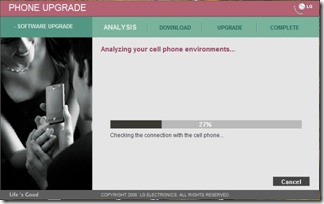
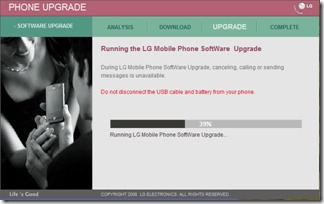
PhoneUpgrade_1 PhoneUpgrade_2 PhoneUpgrade_3

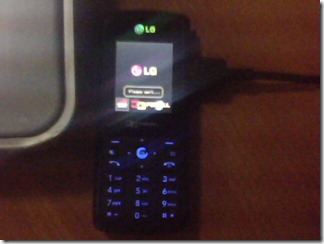
IMG0235A

And.. Well It completed all right without any errors. But…

Houston, We have got a problem… Not a single character is displayed now… smile_sad

I tried again the same procedure but the same result. This time I copied .DZ file from the LGMobile Updater application’s data directory (This file is deleted as soon as upgrade completes) and flashed using the old LGMDP program yet the same result.

So then I tried flashing the old firmware back in order to rectify the problem.

Flash_7

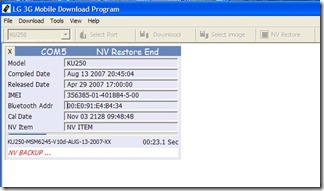
It goes on Backing up NV…

Flash_1

Writing QCBL, AMSS bla bla.. rebooting and restoring NV..Flash_2

And erasing media…

Flash_3

But there is a problem erasing media files (Since some already open to display Battery charging up/ Battery Full display?) So tried again. This time battery charging is not displayed in mobile and There is a Yellow box over the LG logo saying Refreshing… (Media file missing to boot further?)
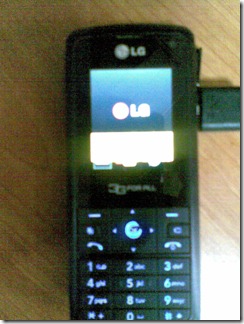
20012009(010)

However this goes trough all of the above steps and ultimately up to media downloading…Flash_5
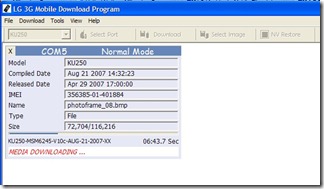
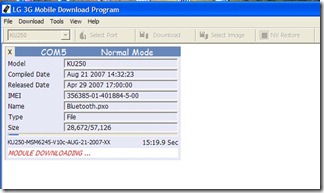
And Module downloading…

Flash_6

If my memory is correct last time everything went well and flashing completed. But this time luck is definitely not on my side… Module download breaks in middle and phone keeps rebooting again and again… Seems no chance of re-flashing as it is now not even detected in the flasher. smile_confusedsmile_confusedsmile_confused So now I’m in a situation that until I flash those modules, it is not detected and without it’s being detected I can’t flash it…

However, fortunately I can yet go to Emergency download mode with 2+5+Power key combination.

Flash_4

However this time only subset of files is there and No Media Image/ Module Image selection option. So even though flashing completes the problem is not resolved. Then I did Selected Erase EFS option from the dropdown box (There is nothing else I can try right?.. smile_thinking) and that time it fixed the problem of rebooting. Then I again flashed in normal mode with Erase EFS option On. That time it went all well. and previous Firmware was restored but there was yet a problem that No Wallpaper files or any default media files. (Possible caused by incomplete NV backup - I noticed one with less number of entries in the NV backup directory)

However now I was pretty much sure that you have to delete the EFS in order to flash correctly and I went ahead with .DZ file with Erase EFS option. Phew.. Thank god everything went OK and I got my good old lovely mobile back again with original firmware… Wow.. now Opera Mini 4 works with no problem.. smile_teethsmile_teethsmile_shadessmile_shades

Guide to upgrade firmware in LG KU250 (Probably other models as well)

Try new LGMobile Updater Application. But this may end up your mobile screwed up if you are an unlucky person like me. smile_winkRemember to copy .DZ file while the flashing is in progress.

If above step had any issues, try re-flashing using LGMDP program with Erase EFS option in NV backup/restore. This will definitely erase SMS, Contacts, Other configuration settings etc. from the phone.

Files:

KU250-V10d-AUG-13-2007-MLY.dz

LGMDP_1_1_.5_Build_12.10_Release.zip

[Posted using Windows Live Writer on Windows 7 Beta.]

Sunday, January 18, 2009

[Drum Roll…] Here Comes Windows 7…

:-)

On January 9th Microsoft has released Beta version of it’s next version of Windows operating system, Windows 7(formerly codenamed Blackcomb and Vienna). In fact I did received the news a bit later and was lucky to download the ISO within 2~3 hours thanks to the high-speed link in LEARN ;-) and since the rush hour was gone…

Well the installation experience was similar to the Vista installation. (And of course ended up with around 8GB used for base OS installation just like in Vista)

New Features in Windows 7 (Build 7000)

A new feature in the productivity is the jump lists in frequently used programs. In this way it is easy to jump into the most recently open document straight away in a single click from the start menu.

Jump Lists

Now it’s much easy to organize the windows by just a mouse gesture. (I suppose it would be much more initiative and fun on a touch sensitive screen as Windows 7 is multi touch enabled) Just drag your window to the top edge of the screen to maximize, drag down to restore, drag to the side corner to fill that half and drag from the bottom to maximize vertically.

The taskbar is also improved. Now it’s height is increased and only the window icon is displayed making it is possible to display more groups/programs opened. The It is also possible to temporally highlight a hidden window by hovering the mouse pointer over a full screen thumbnails in taskbar. This works for the minimized windows as well.

Note: It seems that the screen casts recorded with Windows Media Encoder 9 has poor quality though the recording was really easy.

It also seems the Sinhala Unicode works straight out of the box. (Of course Vista had only minor issues if there was any)

SinhalaIE

There are more features with the Windows 7. for more information you may read, What's new in Windows 7: Faster & easier

And this is my first experience with the Windows Live Writer it seems lot more easy and fun blogging with it. (In fact I prefer desktop applications to web applications. B-) ) Let’s see whether it works correctly with my blogger account.

Thursday, January 8, 2009

Coaching iRobots to play Sumo. B-)

:-)
Since the Algorithms and Project Hoshimi Invitationals has been removed from Imagine Cup -the world’s premier student technology competition, a new theme, named Robotics & Algorithms which is based on Microsoft Robotics Developer Studio products has been introduced. The task during Round 1 is to program a simulated robot entity simulated based on iRobot Create to successfully defeat an opponent in a Sumo ring.Even though it was not clear at first what to do. A clear step-by step guide has been published on Apps Community for MRDS. After meddling trough the code and changing few parameters and algorithms I was able to successfully modify the sample project provided with challenge kit to compete in a more reliable fashion.


Wow it's a win by 3-0. Well It was just luck in 1st round that my robot win. And during next rounds opponents goes out of the ring by itself :-P Anybody dare for a Sumo round?